F1 TV account
Checking…
Other ways to sign in
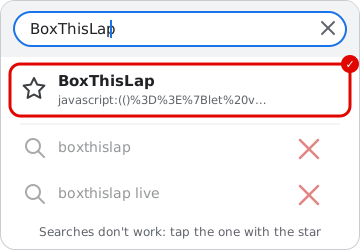
Sign in with the BoxThisLap bookmark
recommended-
Once: put the BoxThisLap button on your bookmarks bar. Drag it there with the mouse (no bookmarks bar? press Ctrl+Shift+B):
Can't drag it?
- Add a bookmark (Ctrl+D), call it BoxThisLap, and in URL paste what you copied (in Chrome: ⋮ → Bookmarks → Bookmark manager → ⋮ → Add new bookmark).
- Sign in on formula1.com with your F1 TV account (top right, “Sign in”):
- Still on formula1.com, click the BoxThisLap bookmark. It brings you back here: click Sign in to confirm. Done.
The bookmark reads formula1.com's login cookie in your own browser and brings it to this page (in the part of the address that browsers never send to a server).
Or paste the login by hand
How to copy the login cookie
- Sign in at formula1.com in Chrome or Edge.
- Press F12 → Application tab → Cookies →
https://www.formula1.com. - Click the cookie named
login-session. Its value starts with%7B%22data%22. - Copy the whole Cookie Value and paste it below.
data/f1tv-token.txt and only ever sent to F1's own live timing server. Tokens last a few days from when you type your password; sign in again before each race weekend for a new one, and the live feed reconnects on its own, without a restart.